
-
Frontpage
-
Getting Started
- Overview
- How to join
- Contacts & Support
-
Use cases
- Suppliers
- Transport companies
- Receiver of materials
-
How to use
- Vehicles & Drivers
- Waybills
-
Orders

-
Automation
- Volume measurement (Loadmon)
- Weighbridge
- Vehicle access control (VAC)
-
Integrations
- API Reference
-
Frequently asked questions
- FAQ
FAQ
I want the waybills in Eeway to close automatically. What do I need to do?
When creating a new shipment/order, there are 4 options for automatically closing the waybills:
- After dispatch – dispatch weight known
- Upon arrival – arrival weight known
- Dispatch and arrival weight known – both dispatch and arrival weight known
- On delivery confirmed – delivery confirmed

By selecting the appropriate option, it becomes active and the waybills will close automatically according to the conditions you have predefined.
How can I add a new user to the company account?
In the left menu, select Settings → Users → Create user.
Note: To add new users, your account must have the appropriate access rights.
I changed data on the waybill/order. Why aren't the changes visible?
After making the changes, you must click the Save changes button on the page. Otherwise, the changes will not be saved.
Is it possible to get notifications when a shipment arrives at its destination?
Inside the order/shipment details, go to the Notifications section and add the email address that should receive the alerts.
You can set up notifications for the following events:
- Operation created
- Operation completed
- Dispatch weight known
Notifications can be sent in Estonian, Latvian, Lithuanian, English, or Russian. You can also choose to attach the waybill (PDF), weighing data, or both.
How can I add a new Site in Eeway?
In the left menu, select Companies. Next to your company, click the View button. In the loading Sites areas section, click Add site.
How can I add certificates for my company in Eeway?
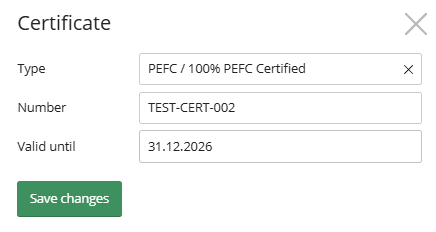
In the left menu, select Companies. Next to your company, click the View button. In the certificates section, click Add certificate.
How can I add a new company to my company account list?
To add a new company or subsidiary to your account in Eeway:
- In the left menu, select Companies.
- Click the Add company button (in the top right corner).
- Search for the needed company and click Add.
Where can I download my waybills?
- Go to the waybills section. In the top right corner click Export (.xls) button.
How can I add CMR to my waybill?
- CMR can be added to an order or a single waybill. If added to an order then all of the waybills that are created with this order will have the CMR added to them.
- To add this, click the Requires CMR button in the bottom right corner of the order or waybill under the Options section.